Welcome to the beginning of a lifelong musical journey. prePiano One is not a toy, and it is not designed for the mastery of the piano. Instead, it is a tool designed for discovery. It is the first step in building a musical ear, creating a foundation for everything that follows.
The Philosophy of the Mentor
In this stage of development, the role of the adult is vital. We believe that encouragement is 80% of teaching. Your goal is not to correct mistakes, but to celebrate curiosity. This app is designed to help children establish a connection with sound, rhythm, and melody before they have even learned to read. Please remember: we are not rushing toward a destination. We are simply enjoying the music.
Getting Started
When you first open the app, a guide will appear to help you begin.
The Basic Mode
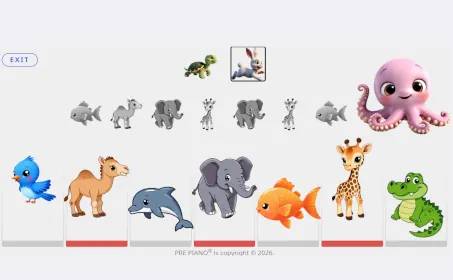
If your child is brand new to sounds and names, you may choose to load the "Basic Version." In this mode, the piano sounds are replaced by spoken words. When a child touches an animal on the keyboard, the app will say the name of that animal. This is a wonderful way to build the connection between the symbol and the name.
The Melody Maker (The Octopus)

In the center of the screen sits the Octopus. Every time the Octopus is pressed, a brand new seven-note melody is generated. The notes will appear in the center row in grayscale to keep the visual field clean and focused on the music itself. Let your child listen to the new melody before pressing the Rabbit or the Turtle — there is no need to rush straight into the lesson.
The Lesson Buttons (Turtle and Rabbit)
At the top of the screen, you will find two ways to practice:
- The Turtle: Plays the melody at a slow, gentle pace.
- The Rabbit: Plays the melody at a slightly faster, more rhythmic pace.
The Animal Keyboard
Since many of our students are in the pre-reading stage, we use animals to represent notes. This allows them to "read" music through symbols they already know and love:
- Bird = B
- Camel = C
- Dolphin = D
- Elephant = E
- Fish = F
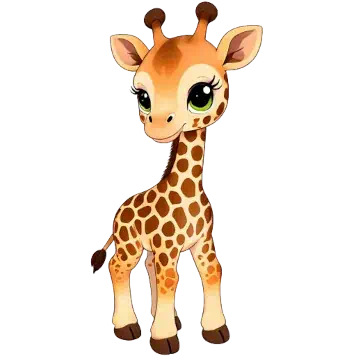
- Giraffe = G
- Alligator = A
How to Practice: The "Listen and Compare" Method
To build a strong musical ear, we recommend a slow and intentional approach. Avoid the temptation to play for long periods. Instead, follow this rhythm:
- Generate: Press the Octopus to create a new melody.
- Listen: Listen to the melody as many times as the child wishes.
- Play: Have the child attempt to play the melody on the animal keyboard.
- Compare: Play the melody again (perhaps using the Turtle) and ask: "Does your playing sound like the Turtle?"
If they match the melody, generate one more lesson. We recommend practicing only two or three lessons at a time. Never rush the process. The goal is to listen, repeat, and build confidence.
A Note for the Mentor
Within the app, you will find two built-in Demos. These are designed specifically for you. They demonstrate how well-known musical structures can be expressed through just seven notes. These demos are intended to show you the depth of the tool you are holding and to reassure you that while the interface is simple, the musicality is profound.